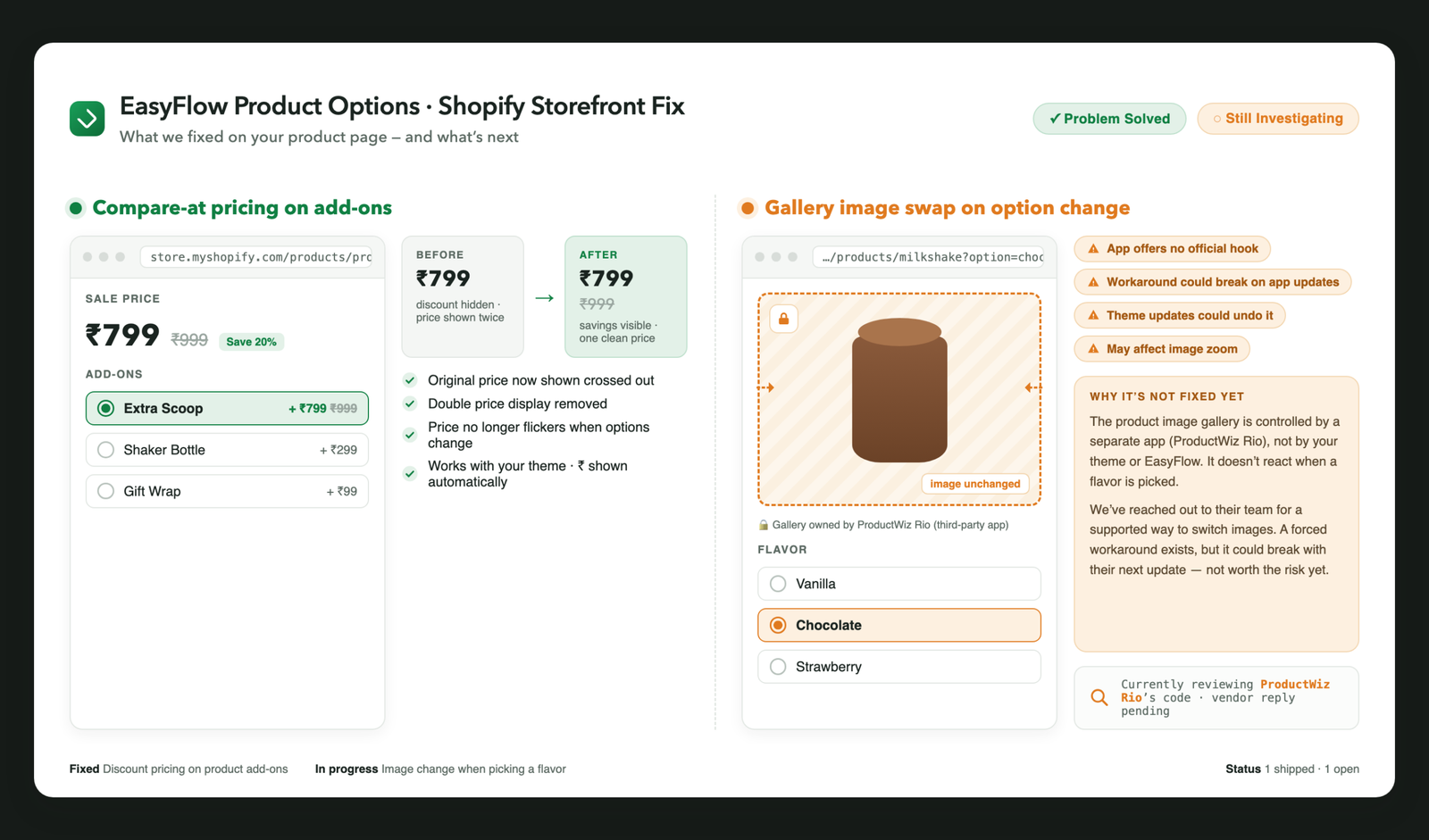
How I solved a discount display bug in EasyFlow Product Options — and why one issue is still waiting on a third-party app vendor.
As a technical support engineer, some of the most interesting tickets are the ones that look simple on the surface. This one started with a single sentence from a store owner:
▎ “My addons show the sale price, but customers can’t see the discount.”
Simple request. Not-so-simple fix. Here’s the full story — what worked, what we shipped, and the one thing we’re still investigating.
The Setup
The store sells products with optional add-ons powered by EasyFlow Product Options, a popular Shopify app for building product option sets. One of the add-ons was on sale: ₹799, down from ₹999.
The problem? The storefront only showed ₹799. No crossed-out original price, no visible discount. To a customer, ₹799 looked like the regular price — which meant the 20% discount was doing exactly nothing for conversions.
There were two smaller annoyances stacked on top:
- The price sometimes appeared twice on the product page.
- The price would flicker or revert when customers switched between options.
Problem 1: The Missing Compare-at Price ✅ Solved
Why it happened
Shopify stores the discount information in a field called the compare-at price — that’s the “was ₹999” number. EasyFlow rendered the selling price of each add-on, but it didn’t pull in the compare-at price alongside it. So the discount existed in the store’s data; it just never made it to the screen.
How I fixed it
I added a small Custom Liquid snippet to the product template. In plain terms, the snippet:
- Looks up the matching variant for the selected add-on, so we’re always reading prices from the right product data.
- Pulls the compare-at price from Shopify and renders it, crossed out, next to the sale price.
- Formats the currency automatically — the store’s ₹ symbol comes from Shopify’s own money formatting, so nothing is hard-coded. If the store ever changes currency, the display follows.
I also switched the add-on picker from a dropdown to radio buttons, so customers see every option — and every discount — at a glance instead of hidden behind a click.
The two bonus bugs
While testing, we tracked down the other two annoyances:
- Duplicate prices came from the theme and the snippet both rendering into the same price area. We scoped our updates to the theme’s exact price element so there’s only ever one source of truth on the page.
- The flicker was a timing issue — a race between the app re-rendering its options and our snippet updating the price. We made the price update wait for the re-render to finish, and cached the variant data so switching options is instant and stable.
The result
- ✅ Sale price shown bold, original price crossed out beside it
- ✅ One clean price — no duplicates
- ✅ No flicker when switching options
- ✅ Works with the store’s theme, no theme edits needed beyond the snippet
The whole fix lives in one Custom Liquid block. No theme rebuild, no extra app.
Problem 2: The Gallery That Won’t Switch 🔍 Still Investigating
The same store had a second request. Their milkshake product comes in Vanilla, Chocolate, and Strawberry — and when a customer picks Chocolate, the main product image should switch to the chocolate photo.
It doesn’t. The selection changes, the price updates… and the image just sits there.
Why this one is harder
The product image gallery on this store isn’t controlled by the theme or by EasyFlow. It’s rendered by a separate third-party gallery app (ProductWiz Rio), which takes over the media area entirely and doesn’t listen when an option is selected.
Here’s the honest support-engineer assessment of our options:
| Approach | Problem |
| Use the gallery app’s API | It doesn’t have a public one |
| Force the image to change with a script | Fragile — the app re-renders its own markup and can wipe out our changes at any moment |
| Modify the theme’s media section | The gallery app overrides it, and a theme update could undo everything |
| Hack it anyway | Risks breaking image zoom and the rest of the gallery |
Could we force a workaround today? Probably. Should we? No. A fix that silently breaks the next time the gallery app updates is worse than no fix — the store owner would just be back with a stranger bug in a month.
What we’re doing instead
We’ve reached out to the gallery app’s team for a supported way to switch images on option change, and we’re reviewing how their app mounts the gallery to see if there’s a stable integration point. When there’s a safe path, we’ll ship it. Until then, this one stays honestly labeled: still investigating.
Takeaways
For store owners:
- If your discounts aren’t visible on the storefront, the data is usually already there — Shopify’s compare-at price — it just needs to be rendered. This is often a small fix, not an app migration.
- When two apps fight over the same part of the page (like a gallery), the right fix goes through the app vendor, not around them. A “quick hack” from a freelancer is how stores end up with mystery bugs after every app update.
For fellow support engineers:
- Price display bugs are frequently timing bugs. If a value shows correctly and then reverts, suspect a race between the app’s re-render and your update — and make yours wait.
- Scope your DOM updates to one precise element. “Close enough” selectors are how duplicate prices happen.
- Know when to stop. Shipping the solvable 80% today beats holding everything hostage to the unsolvable 20%. And telling the client “this part depends on another vendor, here’s why” builds more trust than a fragile workaround ever will.
Have a similar Shopify pricing or product-options issue? The fix is probably smaller than you think — feel free to reach out.